Cellular Modem on Tachyon
The Particle Tachyon leverages the Qualcomm QCM6490 chipset, which includes an integrated 5G sub-6GHz modem. This ensures high-speed, reliable, and globally compatible cellular connectivity.
Overview
The 5G modem inside the QCM6490 provides multi-region support, allowing the Tachyon device to connect to both LTE and 5G networks. This modem supports sub-6GHz frequencies but does not include mmWave.
Key Features of the QCM6490 Cellular Modem
- 5G NR (sub-6GHz) → Provides high-speed, low-latency connectivity.
- 4G LTE fallback → Ensures robust connectivity in non-5G areas.
- Multi-region support → Two variants exist for North America (NA) and Rest of World (RoW).
- eSIM Support → Devices come preloaded with an activated, high-scale data plan.
- Automatic Carrier Switching → Device selects the best network available dynamically.
- Integrated GNSS (GPS) → Provides location-based services.
Regional Variants
There are two different variants of the Particle Tachyon device:
- North America (NA) Build → Optimized for US, Canada, and Mexico.
- Rest of World (RoW) Build → Optimized for Europe, Asia, and other global markets.
💡 Why Different Variants? The QCM6490 modem has different RF front-end requirements for various regions, similar to how modern 5G smartphones operate. For example, iPhones also ship with different RF configurations depending on their sales region.
Antenna Configuration
The Tachyon board features a built-in 5G sub-6GHz antenna, which is directly connected to the modem. Currently, 0external antenna support is not available, though an adapter exists internally (but has not been publicly released).
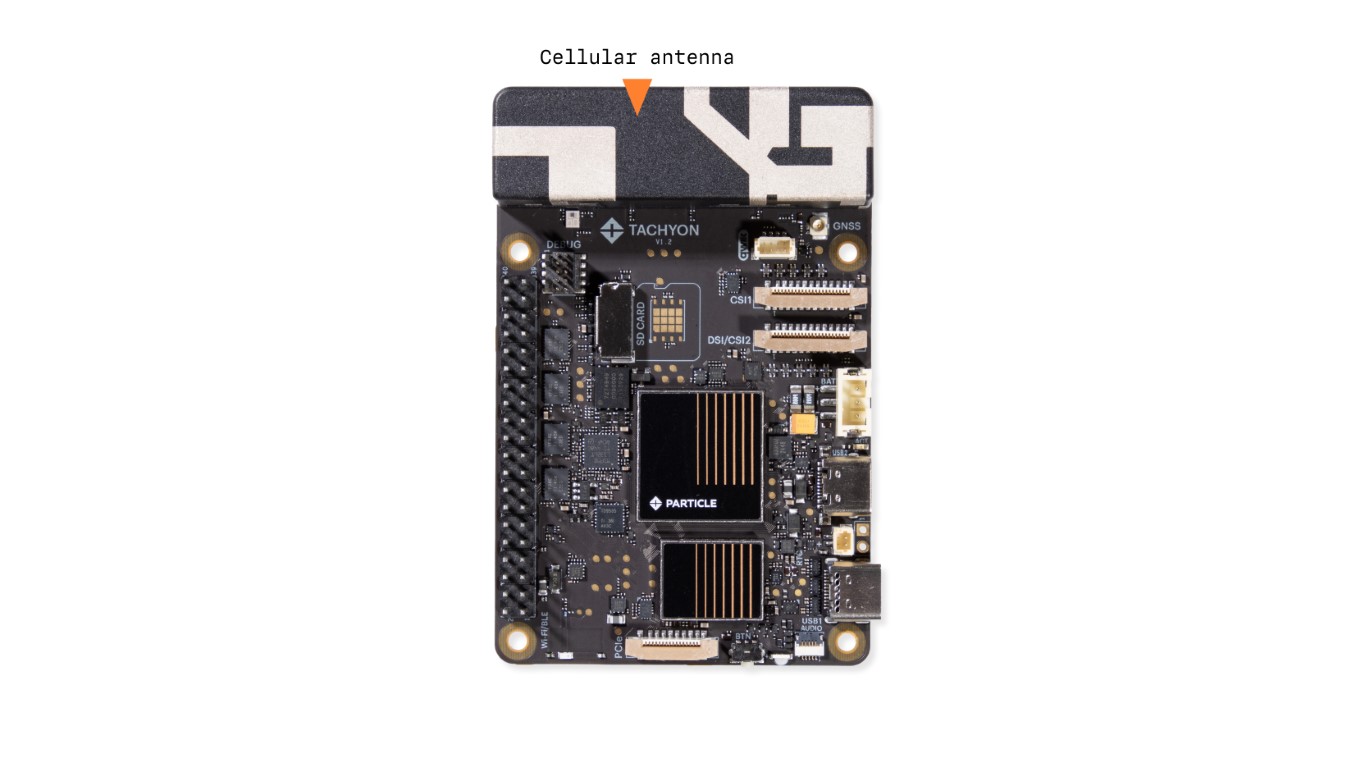
💡 Antenna Optimization We use various combinatorial technologies to mux multiple antennas together, ensuring the best possible performance while reducing the antenna size.
SIM & eSIM Connectivity
The Tachyon device comes preloaded with an eSIM, which is:
- Activated out of the box → No manual activation required.
- Automatically connects → Selects the best available carrier.
- Configured with a high-scale data plan.
For more details, visit the Tachyon Data Plan Page.
Modem Management Commands
Troubleshooting the Modem
If experiencing connectivity issues, ensure the RILD service is running:
systemctl status particle-tachyon-rild
systemctl restart particle-tachyon-rild
Power cycle the modem:
particle-tachyon-ril-ctl disconnect
particle-tachyon-ril-ctl power off
particle-tachyon-ril-ctl power on
particle-tachyon-ril-ctl connect
Checking Modem State
particle-tachyon-ril-ctl state
Examples:
// Not registered yet
particle-tachyon-ril-ctl state
Enabled

// Registered and with a data connection down
particle-tachyon-ril-ctl state
Registered

// Registered and with a data connection up
particle-tachyon-ril-ctl state
Connected
strings returned for state
MM_MODEM_STATE_FAILED:        "Failed"
MM_MODEM_STATE_UNKNOWN:       "Unknown"
MM_MODEM_STATE_INITIALIZING:  "Initializing"
MM_MODEM_STATE_LOCKED:        "Locked"
MM_MODEM_STATE_DISABLED:      "Disabled"
MM_MODEM_STATE_DISABLING:     "Disabling"
MM_MODEM_STATE_ENABLING:      "Enabling"
MM_MODEM_STATE_ENABLED:       "Enabled"
MM_MODEM_STATE_SEARCHING:     "Searching"
MM_MODEM_STATE_REGISTERED:    "Registered"
MM_MODEM_STATE_DISCONNECTING: "Disconnecting"
MM_MODEM_STATE_CONNECTING:    "Connecting"
MM_MODEM_STATE_CONNECTED:     "Connected"
MM_MODEM_STATE_SIM_DISABLED:  "SIM Disabled"
default:                      "Unknown State"
Monitor modem state changes with --follow, Ctrl+C to cancel
particle-tachyon-ril-ctl state --follow
Example output:
Listening for State changes...
Registered
Connecting
Connected
Disabling
Disabled
Enabling
Enabled
Registered
Enabled
Registered
Connecting
Connected
Checking Modem Status
To check if the modem is detected and working:
particle-tachyon-ril-ctl status
Example Output:
state: 12
signal-quality: 42, true
access-technologies: 13
m3gpp-registration-state: 5
m3gpp-operator-code: 310410
m3gpp-operator-name: AT&T FloLive
cdma-cdma1x-registration-state: 4
cdma-evdo-registration-state: 4
cdma-sid: 0
cdma-nid: 0
state
MM_MODEM_STATE_FAILED        = 0  // The modem is unusable
MM_MODEM_STATE_UNKNOWN       = 1  // State unknown or not reportable
MM_MODEM_STATE_INITIALIZING  = 2  // The modem is currently being initialized
MM_MODEM_STATE_LOCKED        = 3  // The modem needs to be unlocked
MM_MODEM_STATE_DISABLED      = 4  // The modem is not enabled and is powered down
MM_MODEM_STATE_DISABLING     = 5  // The modem is currently transitioning to the MM_MODEM_STATE_DISABLED state
MM_MODEM_STATE_ENABLING      = 6  // The modem is currently transitioning to the MM_MODEM_STATE_ENABLED state
MM_MODEM_STATE_ENABLED       = 7  // The modem is enabled and powered on but not registered with a network provider and not available for data connections
MM_MODEM_STATE_SEARCHING     = 8  // The modem is searching for a network provider to register with
MM_MODEM_STATE_REGISTERED    = 9  // The modem is registered with a network provider, and data connections and messaging may be available for use
MM_MODEM_STATE_DISCONNECTING = 10 // The modem is disconnecting and deactivating the last active packet data bearer
MM_MODEM_STATE_CONNECTING    = 11 // The modem is activating and connecting the first packet data bearer
MM_MODEM_STATE_CONNECTED     = 12 // One or more packet data bearers is active and connected
MM_MODEM_STATE_SIM_DISABLED  = 13 // The modem does not have a SIM profile enabled, will be disconnected
signal-quality
<signal_value_percentage> ,<recently_updated_boolean>
- signal_value_percentage = 0 - 100 (%) Note: 255 if invalid
- recently_updated_boolean =
trueif updated within the last 10 seconds,falseif longer than 10s
access-technologies
UTRAN                        = 2   // 3G UMTS
UTRAN W/HSDPA                = 4   // 3G UMTS with High-Speed Downlink Packet Access (HSDPA)
UTRAN W/HSUPA                = 5   // 3G UMTS with High-Speed Uplink Packet Access (HSUPA)
UTRAN W/HSDPA and HSUPA      = 6   // 3G UMTS with both HSDPA and HSUPA (HSPA)
E-UTRAN                      = 7   // 4G LTE
E-UTRAN connected to a 5GCN  = 10  // 4G LTE connected to a 5G Core Network (5GC)
NR connected to 5GCN         = 11  // 5G NR (New Radio) connected to a 5G Core Network (5GC)
NG-RAN                       = 12  // Next-Generation RAN (includes both LTE and NR under 5GC)
E-UTRAN-NR dual connectivity = 13  // 5G NR and 4G LTE working together (EN-DC)
m3gpp-registration-state
MM_MODEM_REGISTRATION_STATE_IDLE      = 0
MM_MODEM_REGISTRATION_STATE_HOME      = 1
MM_MODEM_REGISTRATION_STATE_SEARCHING = 2
MM_MODEM_REGISTRATION_STATE_DENIED    = 3
MM_MODEM_REGISTRATION_STATE_UNKNOWN   = 4
MM_MODEM_REGISTRATION_STATE_ROAMING   = 5
m3gpp-operator-code
Network Operator PLMN <mccmnc>
m3gpp-operator-code: 310410
m3gpp-operator-name
Network Operator Name <name>
m3gpp-operator-name: AT&T FloLive
cdma-cdma1x-registration-state
- N/A - permanently set to MM_MODEM_REGISTRATION_STATE_UNKNOWN (4)
cdma-evdo-registration-state
- N/A - permanently set to MM_MODEM_REGISTRATION_STATE_UNKNOWN (4)
cdma-sid
- N/A - permanently set to 0
cdma-nid
- N/A - permanently set to 0
Query Modem Vitals
particle-tachyon-ril-ctl vitals

signal_strength: -79
rsrp: -112
rsrq: -13
rssnr: -1
mcc: 310
mnc: 410
mccmnc: 310410
mobile_carrier: AT&T FloLive
act: 13
data_connection: 2
status: 0
retry: -1
call_id: 0
type: IP
ifname: rmnet_data0
addresses: 100.88.77.66/30
dnses: 8.8.4.4 8.8.8.8
gateways: 100.88.77.1
mtu: 1360
registration_state: 5
lac: 12345
cid: 8675309
rat: 14
registration_denied_reason: 255
max_calls: 20
tac: 12345
pci: 43
eci: 8675309
csgid: 0
tadv: 0
cgi_valid: 1
last_status_update_ms: 3054
Vitals key: value description
intsignal_strengthRSSI in dBmintrsrpRSRP in dBmintrsrqRSRQ in dBintrssnrRSSNR in dBcharmcc[7+1]3-digit Mobile Country Code, 0..999. "unknown" if no current registration.charmnc[7+1]2 or 3-digit Mobile Network Code, 0..999. "unknown" if no current registration.charmccmnc[14+1]PLMN, MCC and MNC combined into one string of 5 or 6 digits. "unknown" if no current registration.charmobile_carrier[32+1]Network operator name string.intactSee access-technologies above.intdata_connection0=inactive, 1=active/physical link down, 2=active/physical link upintstatusData call fail cause, 0 = no errorintretryData call suggested retry back-off timer value, < 0 means no value suggestedintcall_idContext ID, uniquely identifies the data callchartype[12]One of the PDP_type values in TS 27.007 section 10.1.1. Should likely always be "IP"charifname[32]The network interface namecharaddresses[32]A space-delimited list of addresses with optional "/" prefix length, e.g., "192.0.1.3" or "192.0.1.11/16".chardnses[64]A space-delimited list of DNS server addresses, e.g., "192.0.1.3" or "192.0.1.11". May be empty.chargateways[64]A space-delimited list of default gateway addresses, e.g., "192.0.1.3" or "192.0.1.11intmtuMTU received from networkintregistration_stateSee m3gpp-registration-state above.intlac16-bit Location Area Code, 0..65535, 0 if unknown.uint32_tcid28-bit UMTS Cell Identity described in TS 25.331, 0..268435455, 0 if unknown.intrat14 = LTE (4G), 20 = NR5G (5G). You may notice it idle on LTE and switch to NR5G when send/recv. data.intregistration_denied_reasonEnumerated reason why registration was denied, 0 - 111. 255 if no error. See 3GPP TS 24.008, 10.5.3.6.intmax_callsThe maximum number of simultaneous data calls that can be established. Should always be 20.inttac16-bit tracking area code, 0 if unknown.intpciphysical cell id 0..503, 0 if unknown.inteci28-bit E-UTRAN cell identifier, 0 if unknown.intcsgid27-bit closed subscriber group identity, 0 if unknown.inttadv6-bit timing advance value, 0 if unknown.intcgi_validIndicates if cellular global identity data is 1=valid, 0=invalid. Valid is whencid,lac,act != 0 && act != 255 && mccmnc != "unknown" && rsrp <= -44uint64_tlast_status_update_msMilliseconds elapsed since status was updated, typically under 5000.